
Well, it’s been two weeks and I seem to have all the applications I need installed. After I got Windows 7 up and running (joined our domain, delegated myself the appropriate credentials, applied all released updates, and set the system settings I desired (remote desktop, firewall tweaks, etc)) I began installing additional software.
In this post, I’ll focus on the applications that have given me trouble, as well as some more common suites and if they required any additional work.
Followed by…
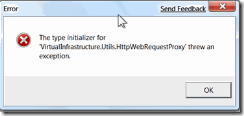
No good. Now, I should mention, Windows 7 appears no where in the compatibility matrix for the vSphere client. But…here’s how to fix it ;) You will need to replace the configuration file for the client, create a folder, copy a new DLL into the folder, and add a new environmental variable. After you find and download the zip file, do the following:
Place the config file in your C:Program FilesVmwareInfrastructureVirtual Infrastructure ClientLauncher folder
Create a new folder called Lib in the folder noted above and place the dll file in this
Edit your system properties and create a new 'Environment Variable" Name it "Devpath" with the value of C:Program FilesVMwareInfrastructureVirtual Infrastructure ClientLauncherLib
Reboot and you should be good to go.
In addition to the client, there is an update service that you have the option of installing when you first install the VMware Infrastructure, or vSphere client: vSphere Host Update Utility 4.0, or VMware Infrastructure Update for pre 4.0 installations. This application will open, but when you try to add a host, it throws an exception similar to the first one above. Because updates are not rampant for VMware hosts, and it’s only a matter of time before VMware releases a new client, I have decided not to spend any more time trying to find a workaround for the update service.
Cisco is a long time fan of Java, and while they are second to none when it comes to networking of data, voice, and video, application programming is well, let’s just say not their strong suit. As they endeavor to go more and more to all things GUI, this is more apparent.
On the end user side, there is a widget for those business users utilizing Cisco’s Call Manager: Cisco Phone Designer. This is a very slick program, it allows you to not only upload your own ringtones and phone wallpaper, but create them too! With the software you can turn any MP3 or WAV file into a ringtone. You can also turn any JPEG, BMP, or GIFF into a custom wallpaper for your 79XX series Cisco IP phone. Pretty slick. While it did take some tweaking to get this app to run on Vista, it will not even successfully launch under Windows 7, or any combination or compatibility mode.
For network management, the Cisco Network Assistant v5.x seems to run just fine. Cisco Security Device Manager, or SDM, also seems to work fine, after making the appropriate modifications in IE 8:
You need to add the IP address of the router to the trusted sites security zone, and allow active content to run in files on your computer, as below:
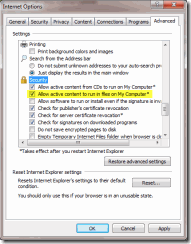
That should allow SDM to run without error.
For Antivirus, I tested AVG Free v8.5, and it both installed and ran without incident. I have sense replaced this with our company software, which is TrendMicro, as AVG Free is not for use in corporate environments; this is a violation of it’s licensing agreement. Trend also runs just fine.
Other software such as iTunes, Putty, Notepad++, Firefox, Techsmith’s SnagIt v9.x, WinRAR, MagicDisc, Google Earth and Sketchup, FileZilla FTP client, ImgBurn, Quicktime, and Windows Live software (Writer, Messenger, and Mesh) all have run and installed flawlessly.
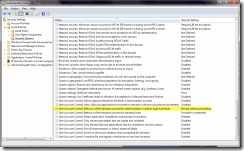
Well, that concludes the bulk of the software in use on my workstation, while there are occasionally errors that pop up, most have been overcome by small adjustments to the User Access Control (UAC) protocols, which unlike some colleagues, I have elected to leave enabled. Most of the problems have been overcome by setting the compatibility settings to have the application always run as administrator. Others have been resolved by creating custom shortcuts that always run as administrator; this is particularly useful for for web applications that require an elevated explorer shell (installing plugins, or making system calls to the registry, etc.). Additionally, I have modified my machine’s local policy to not prompt me for elevation prompts by administrators, demonstrated below:
Overall, there were no show stoppers or road blocks that prevented me from moving to a Windows 7 production machine. I am really satisfied with the improvements of Windows 7, especially on the end user, convenience side. I am eager to get to see the backend from a management perspective…Group Policy, Remote Access, etc.
More to come, stay tuned!